
Version 1.2 Update

“Having multiple users on a console is now commonplace and I love the way the new RCS makes that an easy prospect – nothing to learn because the interface is exactly the same. I also love the enhancements to the user assignable section, and the de-esser has a fantastic little interface, and being available on any bus or channel is excellent.”
- Peter Loader, Audio Engineer
SOS Communications, Australia
The M-5000 Version 1.2 firmware update continues to introduce features previously available only on the highest-end consoles and exclusive “industry first” features to the OHRCA platform. Everything in Version 1.2 makes console operation faster, allows more than one operator to contribute to the mix and provides even more tools to help achieve the best audio mix possible!
Remote Control Software
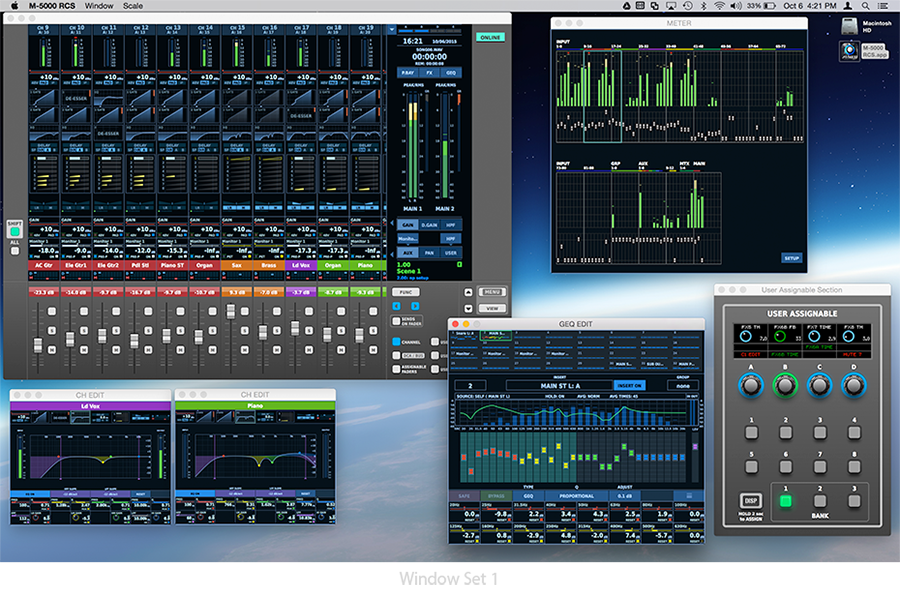
The M-5000 RCS offers real-time remote control of the M-5000 and M-5000C from a connected Mac or PC. More than just an offline editor or external monitor connection. The Remote Control Software allows for the creation of a fully customizable and seamless extension of the console, supporting independent control by the same or a second operator.

Seamless Extension
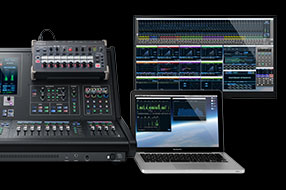
The M-5000 RCS user interface design and workflow is identical to the M-5000 console interface. For M-5000 operators, there are no new workflows to learn. Real-time changes made at the console fully translate to the RCS and vice versa. Whether for pre-event preparation, new user training or the ability to support a second operator or work zone, you don’t need to think about two user interfaces. Be it a PC or Mac, experienced or new operators, RCS maximizes your investment through common navigation and a seamless extension of your console.


M-5000 Series Console Interface
M-5000 Series RCS Software for Mac/PC
"Roland's RCS software for the M5000 console further reinforces my opinion that this console system is a game changer. Where software can often times be treated as an afterthought by manufacturers, this software from Roland is a seamless extension of the console interface. It emulates all functions, appearances, and workflows of the console perfectly, including custom user settings. Transitioning from hardware to software control is seamless and easy. The ability to tear away ANY menu or window to create my own custom user interface on the computer screen, complete with ability to save my custom layouts is brilliant! I now have a second touch screen sitting on the console with my own custom user interface at my fingertips. Well done Roland!"
- Lance G. Spratt CTS, Merge Systems Inc., Canada
Remote Control Local or From a Distance
In addition to being able to connect the M-5000 to a local Mac or PC using a USB cable or LAN cable, you can connect to the M-5000 using existing Ethernet infrastructure or even WiFi. This opens up a whole new opportunity for a second point of control for operators. Combine the native power of the M-5000 and this true remote control and applications such as audio mix from a remote broadcast booth can be achieved without the need for a second console. With support for REAC, Dante, MADI and SDI protocols, a resulting mix or 5.1 surround feed and any other desired channels can be sent to the booth over Cat5e or Coax cable for embedding with video.

Customizable and Resizable Window Sets
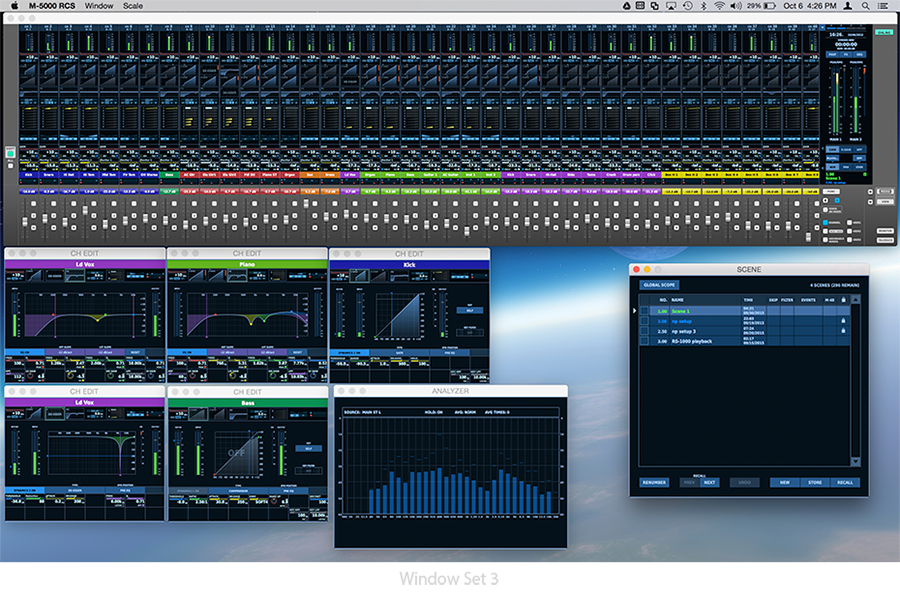
Individual parameters can be “popped-out” to their own window so important elements of the mix are immediately available and each window can be individually resized to make best use of the computer’s desktop. There are almost no limits to the combination of individual windows and views a user can choose and even multiple parameters of the same channel can have their own window. The M-5000 RCS also supports creating “Window sets” so the parameter windows and their layout can be instantly changed by recalling a “Window set” which is incredibly useful for seeing important parameters when changing bands, songs or acts in a play.

<
>
“When I was presented with the M-5000 console from Roland I was very pleasantly surprised. This powerful console was easy to use, flexible, quick and delivered some great functionality such as Anchors. Isolating the fader banks enabled me to configure the surface my way and meant operations was slick. The inbuilt effects were very good and the sound of the console was fantastic and crystal clear, great job Roland!”
- Gary Curtis, FOH Engineer for Slaves & The Shires, U.K.
Touch Screen Ready and Extended Desktop Friendly
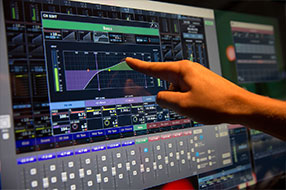
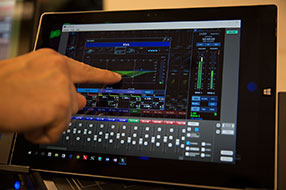
Windows 10 users will be thrilled with the ability to use their touch screen monitors or tablets to navigate the M-5000 RCS interface. You have the same intuitive workflow as you find on the built in 12” touch screen of the M-5000. And for those that just need ‘more’, then take advantage of the extended desktop feature and the customizable window sets of RCS and you have, more!
Touch Screen Monitor
Tablet PC
Extended Desktop
Offline Console Setup / Management
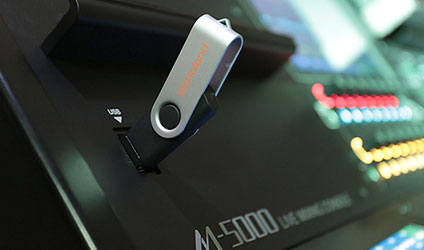
The ability to set-up or edit your console project prior to and between shows is invaluable. The M-5000 RCS can also be used as an offline editor. Console Projects can be imported and saved to USB memory for easy transfer to and from the console and make “fly-dates” a breeze where a rental M-5000 is being used in the next city.
“Lately, I just cannot get enough people in front of this Roland M-5000 console. It’s been impressing everyone immediately.”
- Phil Grimpo, Inspirmedia, USA
Additional M-5000 V1.2 Features
Real Time Analyzer
A dedicated Real Time Analyzer (RTA) windows can be assigned to any audio path in the console for a visual representation of the frequency spectrum of the audio signal. The RTA is also included in as part of the 31 Band Graphic EQ or 8 Band Parametric EQ window so the operator can see the real time effect their EQ adjustments are making to the audio signal.

“The new Roland O.H.R.C.A. M-5000 is an absolutely great product! It combines intuitive user interface, incredibly flexible console architecture, uncompromising sound quality and is perfectly suited to various applications. Mixing with M5000 is a pleasure.”
- Alexey “Midas” Korolev, Audio Engineer, Russia
De-esser option for Dynamics
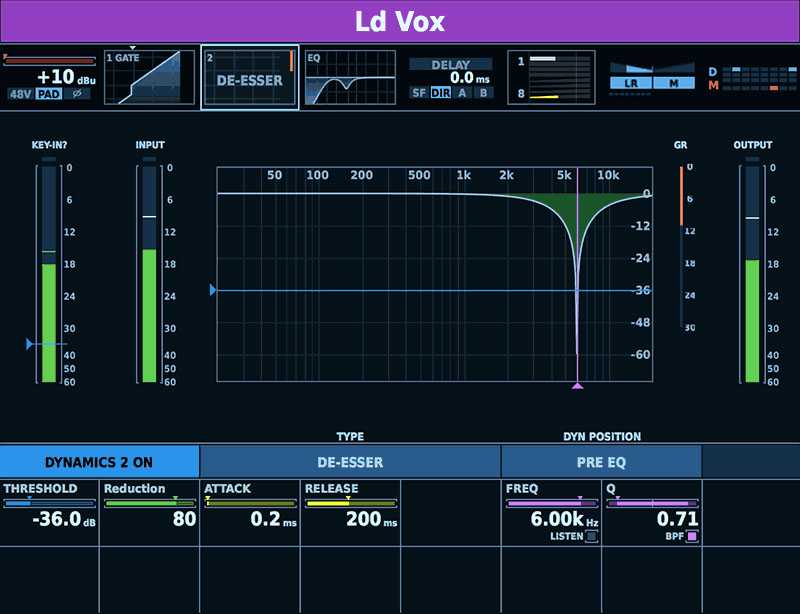
Each M-5000 audio channel features two dynamics processors and Version 1.2 makes available a de-esser as an option for either dynamics processor. The de-essers allows user to attack the sibilance of an input to level it out. It is especially effective when used to reduce “ S'" & “T's" in vocals. This is extremely useful with headset microphones to calm the high frequency spikes in typical headsets. The M-5000 de-esser has both Bandpass and Highpass modes and an incredibly intuitive and accurate user interface.
-18dB/oct & -24dB/oct HPF Slopes
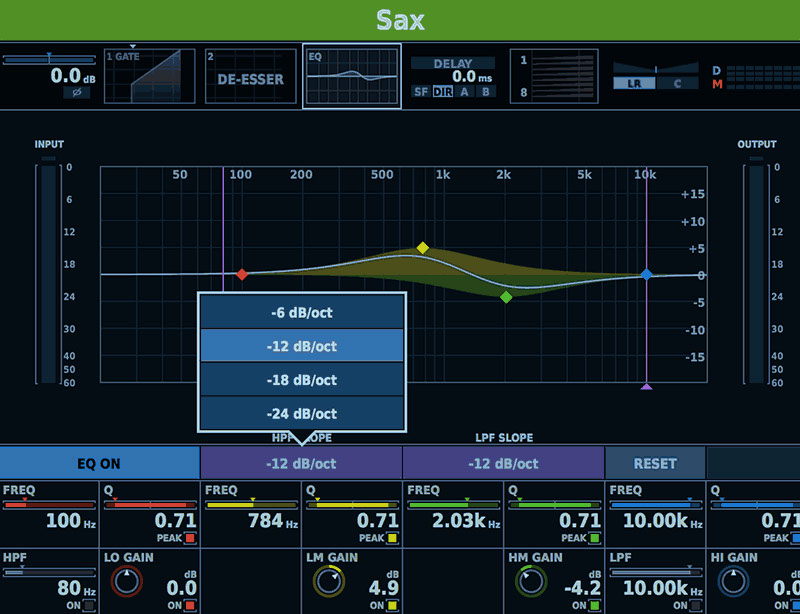
The M-5000 already has the most advanced channel EQ in its class with multiple filter choices across all four bands. The Highpass filter now has two additional filter slope options of -18 dB/oct and -24 dB/oct for even more sound shaping possibilities.
“The CERES ceremony is possibly one of the most complicated shows we work on every year. When we started to see this year's requirements and the script, I immediately thought that this is a job for the M-5000. I’m glad we had the opportunity to use it; it behaved really well and fast. Also we noticed a level up in terms of audio quality compared to other consoles we have been using in previous years. From now on, M-5000 will be my choice, no doubts."
- Pepe Ferrer, Sound System Designer and FOH engineer, Spain
Large Meter Screen
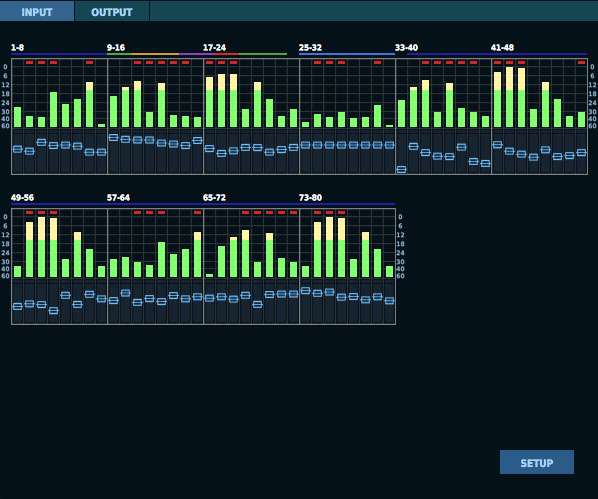
The Large Meter Screen displays the audio level meters of all input and output paths in the console and also serve as a rapid console navigation tool. Simply select a group of eight channels in the large meter screen and the console will instantly jump the edit screen for those channels. In addition, the ability to have the meters change color at a user definable dB level offer a visual cue for potential concerns.
Bus and Oscillator Available as Input Sources:
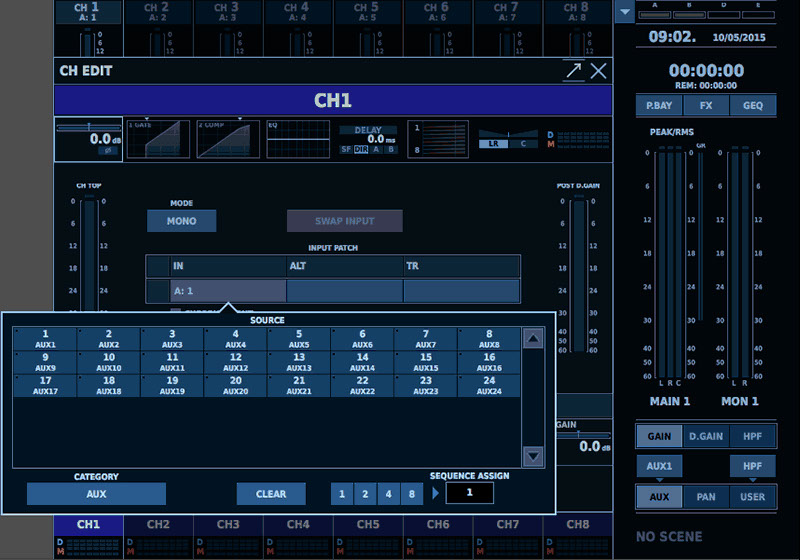
The ability to use any console bus or the built-in oscillators as sources for input channels takes audio routing to a whole new level making extremely complex routing diagrams often used in theatre and broadcast to be easily achieved using less channels than might be required with complex matrixing.
“As Audio Manager, what I was attracted to mostly about the M-5000 is its high number of inputs and outputs, which is more than we have with many of our other consoles, so if we get a really big rehearsal in here, it’s the only console that we have that can really do anything over 48 inputs without having to bring in an outside sub-rental.”
- Doug Dubin, Audio Manager, CenterStaging, USA
Additional M-5000 V1.2 Features
In addition to the powerful Remote Control Software and new features such as RTA and new EQ and Dynmaics options, the M-5000 Version 1.2 Update brings over a dozen new enhancements.
Features
• Key-in Solo for Dynamics
• User assignable section supports “Selected Channel”
• Change Solo Level meter position to “Pre-Trim”
• Change Send on Fader behavior. When entering SENDS ON FADER mode from AUX screen, the AUX will be selected as the send source.
• Add toggle mode for monitor source selection.
• DCA solo AFL
Connectivity and Control
• RS-232/TELNET Control
• MIDI Control
o Faders
o Mute
o Scene Recall
o MMC
M-5000 Remote
There is still more to come for the M-5000 including the M-5000 iPad application for real-time control of the most common mixing parameters from an iPad.
Remote control using an iPad
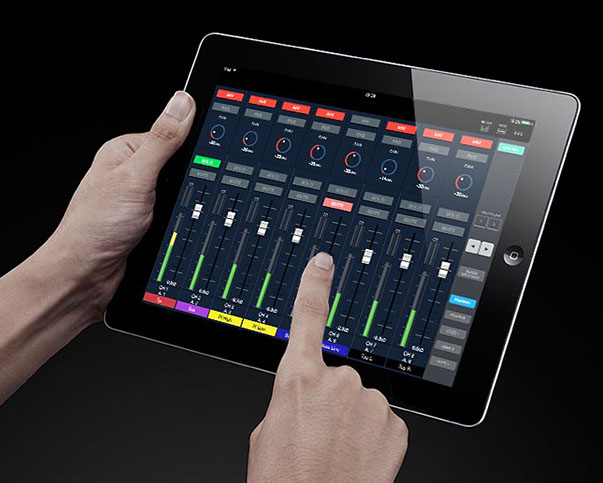
The dedicated M-5000 Remote app provides ultimate portability to many of the goto mix features of M-5000. Any of three methods can be used for connecting the iPad: a) wired hookup using the Dock connector, b) through a router connected to the LAN port, or c) direct ad-hoc connection using a wireless USB LAN adapter. Also, when dock connected, stereo recording and stereo playback is possible to the iPad.
 M-5000 Remote
Dedicated iPad app for remote control. Free download from the
App Store.
Back to top
© 2016 Roland Corporation